
It is common that we wish to highlight some keywords or key phrases in a page of text to draw users' focus, and make it more eye-catching. Purpose of styling is to create a good user-experience for readers. Styling is not just for the purpose of nice looking. It is also a matter of user experience, easy and comfortable reading, psychology and logic. The following examples are different ways to achieve this:
This is bold
This is italic
This is underline
Traditional Text Highlighting
Use of bold, italic, underline attributes applying to text is something we have been using for a long long time.
Fonts
Drupal supports a lot of fonts. In particular, Google fonts is one of the most popular ones, and it is free.
This is Lobster Font, from Google Fonts.
This is Tangerine Font, from Google Fonts.
这是 中国行书 字体, from Google Fonts.
This is highlighted text
Highlight of Text
Highlighting text on web like traditional way using a marker.
Quotation
The conventional method to present something different from the rest, or to the boundary of the quoted text.
This is 'single quote'
This is "double quote"
Title 1
Maecenas sed enim ut sem viverra aliquet eget. Pellentesque adipiscing commodo elit, at imperdiet dui accumsan. Tellus pellentesque eu tincidunt tortor aliquam nulla. Arcu, bibendum at varius vel, pharetra vel turpis nunc. Donec adipiscing tristique risus nec feugiat in fermentum posuere. Risus commodo viverra maecenas accumsan, lacus vel facilisis volutpat. Aliquam etiam erat velit, scelerisque in. Pulvinar proin gravida hendrerit lectus a. Amet venenatis urna cursus eget nunc scelerisque. Auctor urna nunc id
Sub-Title 1A
Nunc aliquet bibendum enim, facilisis. Purus, in mollis nunc sed id semper risus. Integer feugiat scelerisque varius morbi enim. Nisl nisi, scelerisque eu ultrices vitae, auctor eu. Porttitor eget dolor morbi non arcu. Scelerisque eu ultrices vitae, auctor eu augue. Dictum varius duis at consectetur.
Sub-Title 1B
Hendrerit lectus a molestie. Molestie ac, feugiat sed lectus vestibulum mattis ullamcorper velit. Velit euismod in pellentesque massa placerat duis ultricies lacus. Ridiculus mus mauris vitae ultricies leo. Facilisis magna etiam tempor, orci. Eu, facilisis sed odio morbi quis commodo odio aenean. Scelerisque purus semper eget duis at tellus at urna.
Titles and Sub-titles
Using titles and sub-titles are usually used with paragraphs, separating text into different sections. This is a structure.
Indentation
Indentation is much easier to create using word editors like Word, but not on web pages. Forget it on web.
Coloring Text
Use of different colors on text is a technique to draw a clear line how the colored text is different from the rest.
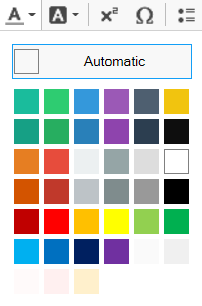
Color Buttons in Editor
Color buttons can be made available in editor to facilitate content creation. 2 modes are available
- Color of the text
- Color of the text background
This is colored text.
This is text with colored background.
Move the "mouse over this text" and color of the text will change
Hover on Text
Move the mouse over the part of text, color will change. This will give a better user feeling that he is pointing at the right target.
Quotes on Web Pages
Quotes are normally famous words or phrases with power of influence by famous people. Quotes in a lot of web-based systems are displayed with a style. However, it is not the same supported in w3.css.
A more traditional way for quotes, by adding a font awesome icon, white background container, larger font size, and the Tangerine Fonts.
"For w3.css, this is the recommended style called a panel, with a pale-green background, a bar on the left, applying the Lobster font, and adjust the font size."
by KF Cheng
-
Move the mouse over "here" Tooltips are text appears when hover over and see the tooltips inline
- Move the mouse over "here"Tooltips are text appears when hover over and see the tooltips offset
Tooltips
Tooltips are sometimes very useful to give a short explanation or reminders without having to leave the page and lose focus.
Abbreviations
Extra text appears on mouse-over. Suitable for dictionary or glossary.
Move the mouse over this underlined "abbr" and see what happens.
Insertion of Icons
Icons is very popular now. This allows content creators to insert icons easily and conveniently on the fly.